Last Updated 2011/10/13
最近はコントロールの 3D 表示が好まれなくなってきましたが、見た目のメリハリを付けるために 3D 表示がほしいときがあります。そこで、Border3D コントロールを作ってみました。
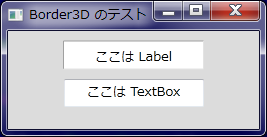
Border クラスから派生し、OnRender メソッドをオーバーライドしただけのものです。実行結果は下図のとおりです。
using System;
using System.Collections.Generic;
using System.Windows; // SystemColors
using System.Windows.Controls; // Border
using System.Windows.Media; // DrawingContext

namespace emanual.Wpf.Controls
{
  public class Border3D : Border
  {
    public Border3D()
    {
      this.Padding = new Thickness(1); // コントロールの内部に描画するので
      this.Background = SystemColors.WindowBrush;
    }

    protected override void OnRender(DrawingContext dc)
    {
      base.OnRender(dc);

      var darkPen = new Pen(SystemColors.ControlDarkBrush, 1);
      var lightPen = new Pen(SystemColors.ControlLightBrush, 1);

      dc.DrawLine(darkPen, new Point(0, 0), new Point(this.Width, 0));
      dc.DrawLine(darkPen, new Point(0, 0), new Point(0, this.Height));
      dc.DrawLine(lightPen, new Point(0, this.Height), new Point(this.Width, this.Height));
      dc.DrawLine(lightPen, new Point(this.Width, 0), new Point(this.Width, this.Height));
    }
  } // end of Border3D class
} // end of namespace
<Window x:Class="Border3DTest.MainWindow"
    xmlns="http://schemas.microsoft.com/winfx/2006/xaml/presentation"
    xmlns:x="http://schemas.microsoft.com/winfx/2006/xaml"
    xmlns:ctrl="clr-namespace:emanual.Wpf.Controls"
    Title="Border3D のテスト" Height="200" Width="300" Background="Gainsboro">

  <StackPanel Orientation = "Vertical">
    <ctrl:Border3D Width="140" Height="28" Margin="10">
        <Label Content="ここは Label" HorizontalAlignment="Center" />
    </ctrl:Border3D>

    <TextBox Width="140" Height="28" Text="ここは TextBox" TextAlignment="Center" />
  </StackPanel>

</Window>
-以上-